Explore Your iPhone with iPhone Explorer

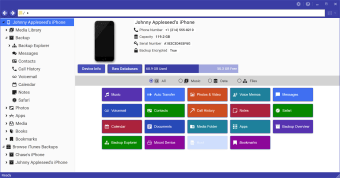
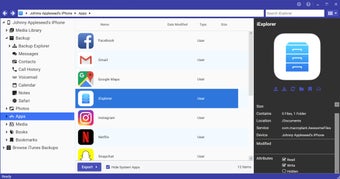
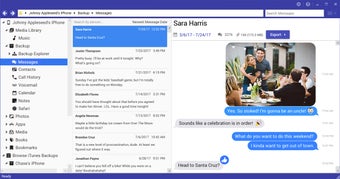
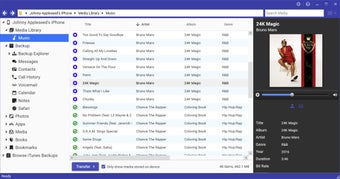
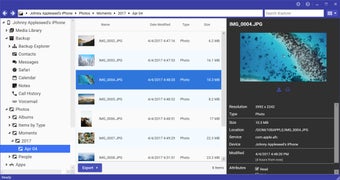
iPhone Explorer is a free utility software designed for Windows users that allows seamless access and management of iPhone files. This application offers functionalities such as browsing files, transferring data, and managing media content directly from a connected device. Users can easily navigate through their iPhone's directory, making it simple to retrieve or modify files without the need for iTunes.

Top Recommended Alternative

The software stands out for its user-friendly interface and straightforward navigation, which caters to both novice and experienced users. iPhone Explorer supports various file types, enabling users to handle documents, images, and music effortlessly. Overall, this tool provides a convenient solution for managing iPhone content on a Windows platform.

 0/5

App specs

Also available in other platforms

Program available in other languages


User reviews about iPhone Explorer

2.3

5 reviews

Add review

Main reviews for you

  • Anonymous user

    Crashes when run.. Just downloaded version 2.1.4.1. Installed it onto Windows 7 x64 - and it crashed: "iPhone Explorer has stopped working". The 'splash screen' came up, then the Windows error dialog box. Seems pretty useless. Lot's of people seem to swear by it.I am REALLY beginning to hate Apple - why the hell will they not let me back up *MY* App Data?!!You know things are bad when you cannot even find a decent 3rd-party program to do something that should be so basic.FYI, avoid AnyTrans too - that only partially works - does everything but actually back up the App Data... Pros: Install was easy Cons: Make it not crash

  • Anonymous user

    Program would not run on Windows 8.1. Program did not run on Windows 8.1 so I hasd to uninstall it.

  • Anonymous user

    The program didn't work. I couldn't use the program for nothing but just see my iphone files. I can not overwrite file so that I can't personalize the notificacion sound of my application as i did with the version before the actualizacion.

  • Anonymous user

    Did not work at all. This program does absolutely nothing. I was able to view the files on my iPhone (which were poorly organized), but unable to move or delete them. Why would I want to see my files if I can't do anything with them? Useless program.


  • Anonymous user

    Can't view my files. only shows files in DCIM folder and DOWNLOADS, i've installed the AFC2Add to view the real root folder and didn't work Pros: last version was better Cons: bad update

More

You may also like

Alternatives to iPhone Explorer

Explore Apps

Latest articles

Laws concerning the use of this software vary from country to country. We do not encourage or condone the use of this program if it is in violation of these laws.
Softonic

Is iPhone Explorer safe?

100/100

Score result: Clean

This file passed a comprehensive security scan using VirusTotal technology. It is safe to download.

  • Virus free
  • Spyware free
  • Malware free
  • Verified by Security Partners

    VirusTotal logo

Scan Info

Last scan
Friday, August 4, 2023
Scan provider
VirusTotal · Full report

File Integrity

File
iExplorerSetup.exe
SHA256
c1dcda62d81922b3ada03f772864f3c4a37fb2631c2ccf43e349b14af94af627
SHA1
c3e329b1b652020ba67b98afa7185b41b8d67137

Softonic security commitment

iPhone Explorer has been thoroughly scanned by our advanced security systems and verified by industry-leading partners. This file comes from the official developer and has passed all our security checks, showing no signs of viruses, malware, or spyware. For more information, visit our Security and Trust Center